Posts

Showing posts with the label Data Load Rule

The evolution of scheduling in EPM and why Pipeline’s have all the answers!
Image
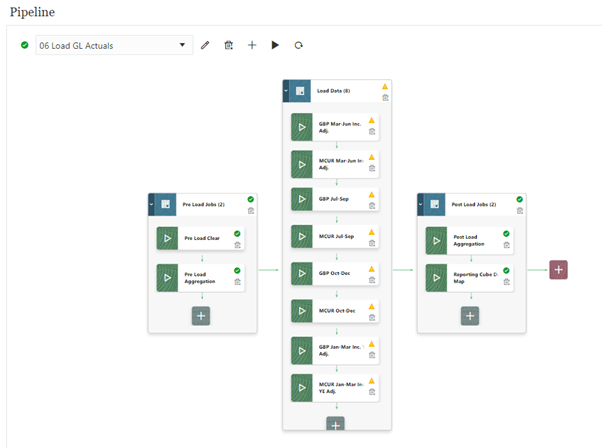
In the past, when data load jobs needed to be scheduled in EPM, there were two main options; Batches or EPM Automate scripts. Now however, there is a third option of the new Pipeline functionality which was released as part of the new Data Integration interface in June 2023. Pipelines are set to replace the existing Batch functionality currently available in Data Management, that will soon be decommissioned by Oracle. While it’s always exciting when Oracle release new functionality, it can be hard to keep up sometimes – this switch however is one that is definitely worth the effort! This blog will tell you all about the differences between the old Batch functionality, existing EPM Automate scripting and the new Pipelines, and why it’s worth making the switch to Pipelines as soon as possible. 1. Batches   Let’s start with Batches. If you’ve not used them before, Batches are defined and scheduled within data management and are a way to schedule a range of data management load ...

Loading Oracle Cloud ERP GL Balances to ARCS

Image
When loading GL balances from Oracle Cloud ERP to Account Reconciliation Cloud (ARCS), there are a few differences to the standard process used when loading to FCC and EPM Planning. This blog will detail the full setup process required when loading GL balances to ARCS for reconciliation compliance. Before setting up the GL balances load from Oracle Cloud ERP to ARCS, there are a couple of prerequisite tasks required, which are part of the standard ARCS setup. Firstly, ensure the correct Segments and Sub-Segments have been specified in the Configuration -> System Attributes area. This is a fundamental part of the ARCS setup, which cannot be reversed without rebuilding the application. Then add all the necessary ARCS Profiles and run the Create Reconciliations job for the required period. To setup the GL balances data connection to Oracle Cloud ERP, the following 11 steps are required: 1. Setup the ERP Cloud Source System As this is an Oracle built connector, it’s as simple ...